How to Choose a Charging Stand for Apple Watch and iPhone?

Choosing a Charging Stand For Apple Watch And Iphone is less about finding the most polished design and more about matching your daily routine. A stand may sit beside your bed, on a crowded desk, or near the kitchen counter. Each spot brings different needs. A stable base matters when you lift the watch with one hand. A compact footprint helps when space is tight. Small details count.

Before buying, check which Apple Watch and iPhone models the stand supports. Confirm whether it includes charging hardware or requires your own cables and power adapter. A magnetic watch charger should hold the watch securely, while the phone pad should align with its charging coil. Cases can affect that fit. So can camera bumps. Check the manufacturer’s compatibility notes, not just the product photos.

Then consider charging speed, cable routing, viewing angle, and build quality. A tilted phone can make notifications easier to see, but a steep angle may feel awkward on a low nightstand. Metal and weighted bases often feel reassuring; they are not automatically better. Heat is worth noticing, too. Follow the maker’s guidance and avoid covering the charger during use. Keep it simple.

This guide will compare stand styles, explain key compatibility checks, and highlight practical features that are easy to overlook. There is no perfect choice for every room. Even a well-reviewed stand may wobble on a soft surface or clash with a bulky case. A little measuring before checkout can prevent that familiar disappointment.
How to Choose a Charging Stand for Apple Watch and iPhone?

Identify Your Apple Watch and iPhone Charging Requirements

Before choosing a stand, check how your watch charges: some models need a dedicated magnetic charging puck, while others may not align with a generic wireless pad. Then check your phone’s charging method and maximum supported input. A stand that supports both devices can still charge one slowly if its power adapter is underpowered. The Wireless Power Consortium has reported more than one billion Qi-certified devices shipped worldwide, showing how common this wireless standard is; it does not guarantee that every watch supports Qi charging. Compatibility matters more than appearance.

Think about your daily setup. Will the stand sit beside a bed, where a dim indicator and stable base matter, or on a desk, where a visible screen is useful? Check whether both devices can charge at the same time, and whether their cases interfere with contact. Small details count. I would still verify the exact watch model before buying; product listings can be vague.

Tips: Match the stand to your devices’ charging specifications. Use a suitable power adapter, and leave space around the stand for airflow. Test alignment before settling on a permanent spot.
How to Choose a Charging Stand for Apple Watch and iPhone?

Identify Your Phone’s Wireless Charging Requirements

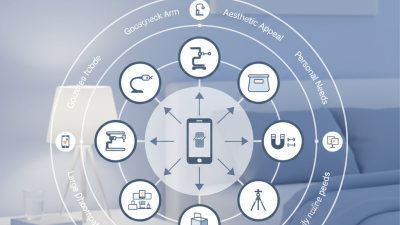
Check which wireless charging standard your phone supports before choosing a stand. The chart shows standard maximum rated power—not guaranteed charging speed. Actual performance depends on device compatibility, the stand, and its power adapter. A smartwatch generally needs its own compatible magnetic charging module rather than a phone’s wireless charging pad.

Compare Charging Stand Designs and Placement Options

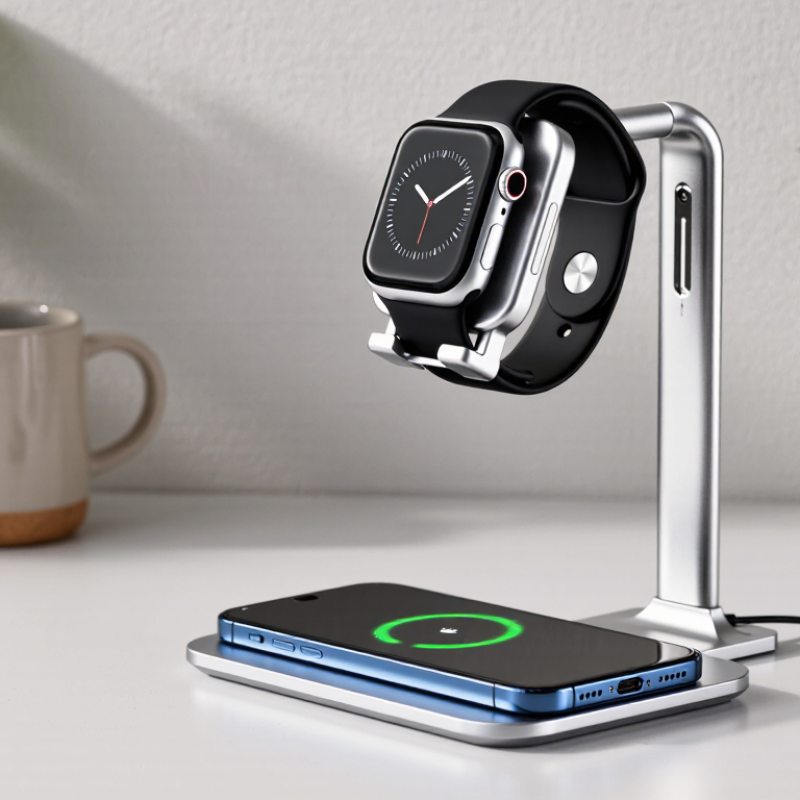
Charging stands usually fall into a few practical designs. A vertical stand keeps the phone upright and places the watch beside or below it. This makes the screen easy to glance at from a desk. A flat charging pad takes less visual space, but notifications may be harder to read. Some stands use adjustable arms. Check that both devices sit securely and that the watch charger fits the stand’s opening.

Placement changes what feels convenient. On a nightstand, a low, stable base is less likely to catch a sleeve or charging cable. A bedside stand with a tilted phone position can make the screen visible without lifting it. On a crowded desk, look for a narrow footprint and a cable channel. Small details matter. A glossy surface can show fingerprints, while a textured base may stay put better on a smooth tabletop.

Consider how you use the devices, not just how the stand looks. If you remove the watch often, a design that releases it easily may save daily annoyance. Check whether the phone can charge with its case attached, since openings and supports vary. A stand that holds everything neatly may still feel awkward if cables pull at the base. I have found that placement is easy to underestimate; even a tidy setup can become irritating when a connector is hard to reach.

How to Choose a Charging Stand for Apple Watch and iPhone? – Compare Charging Stand Designs and Placement Options

Stand design Typical placement Approx. footprint Charging arrangement Advantages Things to check Best suited to
Upright dual-device stand Desk, dresser, or bedside table About 12–18 cm wide and 8–12 cm deep Holds a phone on a wireless charging surface and a watch on a magnetic charging puck or connector. Keeps both devices visible; the raised phone can be convenient for notifications and video calls. Confirm phone alignment, stand stability, and whether the watch charging connector is included or must be supplied separately. Everyday desk use and users who want both screens easy to see.
Multi-device charging station Bedside table or shared charging area About 15–22 cm wide and 10–16 cm deep Usually provides separate positions for a phone, watch, and sometimes wireless earbuds; each position may use a different charging method. Can reduce cable clutter and keep several devices in one place. Check the included power adapter, total power requirements, device compatibility, and whether all charging modules are included. People charging multiple devices overnight or in a compact home setup.
Foldable travel stand Travel bag, hotel desk, or small workspace Often folds to roughly 8–12 cm long; dimensions vary by model May position a wireless phone charger and a watch charging puck; some designs require the user to install their own charging hardware. Portable and easy to store when not in use. Look for a secure hinge, a non-slip base, cable routing, and a setup that remains stable when the phone is tapped. Frequent travelers and people with limited desk space.
Weighted, adjustable desktop stand Workstation or home office About 12–20 cm wide; base depth is commonly 10 cm or more Supports a phone at an adjustable viewing angle; a separate arm or mount can hold the watch charger. A stable base and adjustable angle can make the phone easier to view while seated. Check the adjustment range, base weight, charging alignment at different angles, and cable access. People who use their phone as a desk display or for video calls.
Low-profile bedside stand Nightstand or narrow shelf About 10–16 cm wide and 8–13 cm deep Places the phone at a low angle and the watch beside it, often with separate charging cables or modules. Keeps the overall height low and can fit beneath shelves or beside a lamp. Make sure the phone is easy to lift, the surface has enough space for the watch band, and cables reach the nearest outlet. Small bedside tables and users who prefer a tidy, unobtrusive setup.

Note: Dimensions are approximate examples, not industry standards. Wireless charging depends on the phone model, charger specifications, and correct alignment. A stand may hold an Apple Watch charging puck without including the puck itself; check the product contents and compatibility before purchasing.

Check Device Compatibility and Charging Standards

Before buying a charging stand, check the exact watch and phone models it supports. Similar-looking devices may use different charging hardware. A watch often needs a dedicated magnetic charging puck, while a phone may use a wireless charging pad or a cable. Read the stand’s compatibility list carefully. “Fits most devices” is not precise enough.

Check the charging standards, too. A stand that supports Qi wireless charging may work with many phones, but alignment and charging speed can vary. Look for clear output ratings, such as watts, and confirm that the included power adapter can supply enough power for every charging spot. A weak adapter can make charging slow or unreliable. Small detail, big difference. Also check whether a phone case interferes with the connection; thick cases and metal accessories can prevent proper charging. I once assumed a magnetic mount would hold every phone securely. It did not. Verify the required cable, adapter, and watch charger before ordering, and leave room for a little trial and error.

Evaluate Power Output, Cable Needs, and Safety Features

A charging stand should match the devices’ real power needs, not just advertise a large total wattage. The Wireless Power Consortium’s Qi2 specification supports up to 15 watts for compatible phones, but a stand’s shared output may drop when two devices charge together. Check the output listed for each pad, and confirm the included adapter can supply the stand’s full input requirement. Small print matters.

A watch charger may need its own magnetic puck or cable, while a phone pad may work without a separate lead. Look closely at the product photos and specifications: some stands hide cable channels, others require you to provide the charging puck. USB-IF’s USB Power Delivery 3.1 specification allows power levels up to 240 watts, but that broad ceiling does not mean a small stand needs a 240-watt adapter. Match the maker’s stated input instead. I have learned that a tidy-looking stand can still leave one cable dangling across the bedside table.

For safety, seek over-temperature and overcurrent protection, plus foreign-object detection on wireless pads. Prefer a stand and adapter with recognized electrical safety certification, and keep ventilation openings clear. A thick case, metal ring, or poorly aligned watch can slow charging or create extra heat. If the stand feels unusually warm during ordinary use, unplug it and check the manual rather than assuming warmth is normal. Worth checking.

Choose a Stand That Fits Your Budget and Daily Routine

A charging stand should match the way you use your phone and watch, not just look tidy on a desk. Set a budget before comparing finishes and extra features. A simple stand may be enough if you charge overnight in one place. Check whether it includes charging components or only holds the cables you already own. That detail can change the real cost. Small print matters.

For a shared bedside table, choose a stable base and a layout that keeps both screens easy to reach. A tilted phone holder can make alarms visible, while a watch charger should sit at a comfortable height for placing and removing the watch. If you move between rooms, a lighter stand with a compact footprint may suit you better than a heavy display-style model. Measure your available space. A stand that crowds a lamp or hides a cable becomes annoying fast. Also check that its charging setup supports your devices; appearance alone cannot confirm compatibility. I would not pay extra for features I rarely use, though it is easy to underestimate how much a tidy charging spot helps.