Choosing a Foldable Phone Holder is not just about finding a stand that folds flat. It must hold your phone securely, adjust easily, and suit the way you actually use it—at a desk, on a bedside table, or during a video call. Counterpoint Research reported that global foldable smartphone shipments grew 48% year over year in the second quarter of 2024. That growth points to a wider mix of phone sizes and designs, making compatibility worth checking before you buy. A holder that grips a slim phone may feel unstable with a larger model or a bulky case.
Small details matter. Check the holder’s stated phone-width range, hinge resistance, base footprint, and whether its contact points have protective padding. If you often tap the screen, look for a base that stays put on a smooth tabletop. For travel, compare folded dimensions and weight; a compact stand is less useful if it wobbles under a light touch. Materials tell part of the story, but not all of it. A metal frame can feel reassuring, yet a poorly designed joint may still loosen over time.
There is no single best option. Your phone, case, viewing angle, and daily habits should guide the choice. Independent product testing can help, but real-world stability may vary by surface and device. That’s worth admitting. This guide explains the features to compare, common trade-offs, and practical checks that can help you choose a holder that fits your routine—not just the product photos.
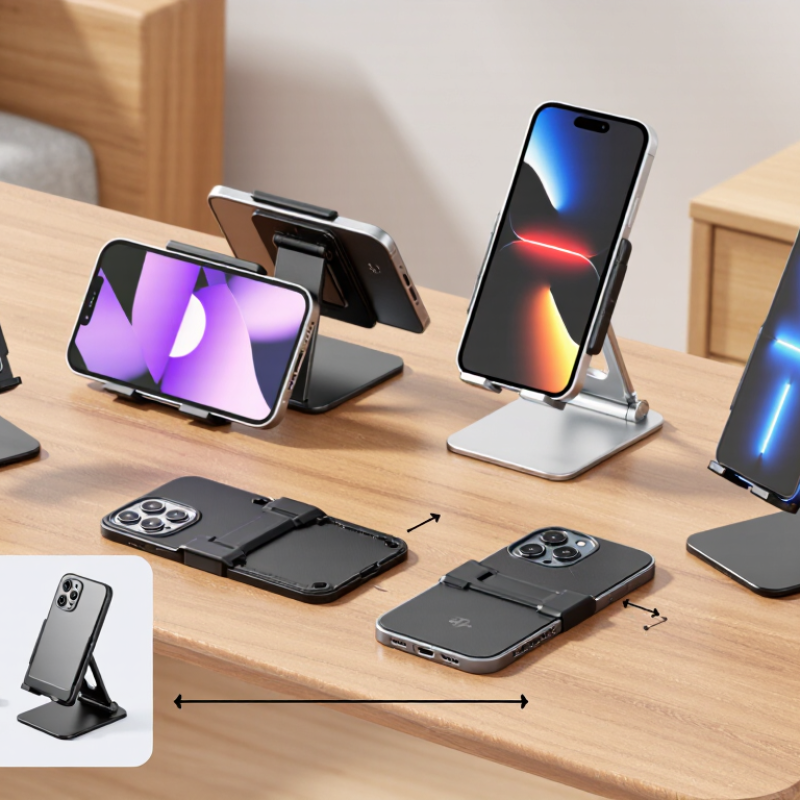
A foldable phone holder should open smoothly and stay firm when you tap the screen. Check its hinge for controlled resistance; a loose joint may let the phone slowly tip forward. A broad base and grippy pads help prevent sliding on a polished desk. Small details matter. Also check the holder’s folded size and weight if you plan to carry it in a small bag.
Common types suit different settings. Compact tabletop stands are light and quick to unfold, making them useful for video calls or watching a recipe beside the stove. Adjustable desktop holders often offer more height and angle options, but their extra joints can add bulk. Clamp-style holders attach to a desk edge or shelf and free up surface space. They need a sturdy edge, though, and may not fit thick tables.
When comparing features, look for a cradle wide enough for your phone with its usual case attached. Raised lips should support the device without covering buttons or a charging port. A ball joint can make portrait and landscape viewing easier, while a simple hinge may feel steadier. I would test the angle with a few firm screen taps. A stand can look sturdy yet wobble under everyday use. Not always. Fold and unfold the hinge several times, too; stiff mechanisms can be awkward, while very loose ones may wear poorly.

Compare common holder types across four practical features. Scores are indicative qualitative ratings, not standardized test results; individual designs vary.
How to read it: Higher scores indicate a stronger typical fit for that feature. Choose a compact fold-flat stand for travel, a multi-angle desktop stand for flexible viewing, or a clamp mount for a more secure fixed setup.
A foldable phone holder should fit the device both open and closed. Check the phone’s width, thickness, and weight, then compare them with the holder’s stated limits. A case adds bulk, especially around the camera bump or hinge. Measure your phone with its case on. A snug fit matters. Too much pressure can make the phone wobble or strain the hinge area. Counterpoint Research reported that global foldable-phone shipments reached about 16.2 million units in 2023, showing how quickly this device category is growing. That variety makes “universal fit” claims worth checking, not simply trusting.
Tips: Look for adjustable clamps with soft contact pads and enough depth for your cased phone. Test the holder in portrait and landscape positions. If your device folds, check that the clamp does not press on the crease or block the hinge. Also confirm that buttons, charging ports, and the camera remain accessible. Small details matter here.
Compatibility can be easy to overlook. Some holders grip only the lower edges; others rely on a magnetic plate or a specific mounting surface. Verify the attachment method before buying, and check whether it works with your case. A heavy device may slowly tilt on a weak joint. I would not assume a holder stays steady just because it feels sturdy in the hand. Test it on a firm surface, with the screen open and closed.
A foldable phone holder lives or dies by its hinge, not its finish. Check the arm where it pivots: metal pins should sit flush, and the joint should move without gritty jumps. MatWeb’s typical material data sheets list 6061-T6 aluminum at about 2.70 g/cm³, compared with roughly 8.0 g/cm³ for 304 stainless steel. Aluminum can keep a stand light; steel can add mass and resist wear. But alloy grade and machining matter more than a shiny surface.
Look for a hinge that holds its angle under your phone’s weight. Open and close it several times, then tap the screen gently; the holder should not slowly sag. Small details count. A wide hinge barrel and evenly spaced friction washers often feel steadier than a narrow joint with a sharp wobble. Ask whether cycle testing was done, and request the tested load, number of folds, and pass criteria. A bare claim of “durable” tells you little.
Corrosion can quietly weaken exposed hardware, especially near a kitchen sink or in a humid room. The Aluminum Association’s material guidance gives aluminum a density near 2.7 g/cm³, but that number alone cannot predict hinge life. Coating, water exposure, and contact between unlike metals also matter. I still prefer a slightly heavier stand when its hinge feels controlled. Not always, though: added weight can make a travel holder annoying. Look for test records, not just a reassuring click.
| Material or Feature | Typical Characteristics | Build-Quality Checks | Hinge and Durability Considerations | Best Suited For |
|---|---|---|---|---|
| ABS or other molded plastic | Lightweight and commonly used for the body, legs, or phone cradle. Quality varies with the plastic grade, wall thickness, and molding. | Look for even seams, firm joints, no sharp edges, and parts that do not flex excessively under gentle hand pressure. | Plastic hinge components can wear or loosen with repeated movement. A well-fitted hinge and reinforced pivot area matter more than a glossy finish. | Everyday indoor use where low weight and easy portability are priorities. |
| Aluminum alloy | Offers a rigid, relatively lightweight structure and is often used for support arms or frames. Surface finishes may scratch or wear over time. | Check for smooth edges, stable joints, and a base that stays flat. Inspect any connection between metal arms and plastic parts. | Metal arms do not guarantee a durable hinge; the pivot, fastener, and friction mechanism still determine how well an angle is held. | Users who want a firm, adjustable stand for a desk or countertop. |
| Stainless steel | Strong and resistant to corrosion in normal use, but can add weight. It is commonly found in pins, screws, or small structural components. | Check that exposed edges are smooth and that fasteners sit securely without protruding or wobbling. | A metal pin can provide a robust pivot, but looseness may still develop if the surrounding joint or friction washer wears. | Hinge or fastener components where strength and resistance to everyday wear are important. |
| Silicone or TPE contact pads | Soft, grippy materials used where the holder touches a phone or supporting surface. They help reduce slipping and surface scuffs. | Check that pads are securely attached, cover the contact points, and do not peel or shift when lightly rubbed. | These materials do not strengthen the hinge, but stable grip can reduce unwanted movement while the phone is in use. | Protecting a phone’s edges and improving grip on smooth desks. |
| Friction hinge | Uses resistance at the joint to hold the holder at a selected angle. It is a common approach for adjustable foldable stands. | Open and close it through its intended range. Movement should feel controlled, without grinding, sudden slipping, or excessive side-to-side play. | Resistance can change with use. A hinge that already feels loose or uneven may be less likely to hold its angle reliably over time. | Adjustable viewing angles for video calls, reading, or hands-free viewing. |
| Detented or notched hinge | Uses set positions rather than continuous adjustment. The positions are easier to identify but offer less freedom between angles. | Check that each position engages clearly and that the parts align without needing excessive force. | Distinct stops can help prevent gradual angle drift, though the notches and surrounding material can wear with repeated folding. | Users who prefer a small number of repeatable viewing positions. |
| Base stability and contact area | A wider footprint and non-slip contact points generally help resist tipping on a flat surface. | Place the stand on a level surface and test it with a phone-sized load. Check for rocking and whether the base slides during normal screen interaction. | A stable base reduces extra movement at the hinge, but it cannot compensate for a hinge that slips or has excessive play. | Touchscreen use, typing, and larger or heavier phones. |
| Folded joints and finish | Compact designs have multiple moving parts and close-fitting sections. Small gaps and exposed pivots are common design features. | Look for parts that fold without catching, exposed pinch points, loose screws, cracks, or sharp burrs. | Repeated folding stresses pivot areas. Smooth, consistent movement and secure joints are useful signs, but do not prove a specific service life. | Frequent carrying in a bag or regular setup and pack-away use. |
| Overall selection rule | Material choice, joint design, phone fit, and base geometry all affect real-world performance. | Test the holder with the intended phone and case, if possible. Confirm that the phone sits securely and the stand remains stable at the desired angle. | Avoid judging durability by material labels alone. Product-specific hinge-life figures should be supported by a stated test method and cycle count. | A holder that matches the phone’s size, the intended surface, and how often it will be folded. |
A good foldable phone holder should place the screen near eye level without making you lean forward. On a desk, a shallow tilt can work for typing, while video calls often need a more upright position. Look for several angle settings, not just a hinge that swings freely. Small changes matter. If the hinge loosens, the phone may slowly dip during a call. Test the holder with your phone and case; a bare phone can sit differently. There is no perfect angle for every desk, so adjust it after a few minutes of actual use.
Stability depends on more than weight. A broad base, grippy feet, and a firm hinge help prevent sliding when you tap the screen. On a smooth tabletop, a narrow base may wobble, even if the stand feels sturdy in your hand. Try tapping near the phone’s upper corner and watch for movement. Adjustability should feel controlled: the hinge needs enough resistance to hold its position, but not so much that opening it takes both hands. A little stiffness can help. Too many joints, though, may add bulk and create more points of wear. That trade-off is easy to overlook when comparing features.
A foldable phone holder should fit the way you actually move through the day. Check its folded size and weight before comparing extra features. A slim model can slip into a jacket pocket or a small pouch beside your charger. Small enough matters. If the hinge feels loose or the stand wobbles on a desk, portability loses its appeal quickly. Look for a base that sits flat and supports your phone without needing constant adjustment.
Price is useful only when it matches the holder’s likely workload. For occasional video calls, a simple adjustable stand may be enough. If you use your phone for recipes, reading, and meetings, sturdier joints and several viewing angles may justify spending more. Check whether the holder works with your phone case and leaves room for a charging cable. Product descriptions do not always make those details obvious, so measurements and user photos can help. Still, photos can be misleading.
Think about where you will set it down: a narrow bedside table, a crowded work surface, or a kitchen counter near splashes. A compact stand may save space but feel less stable on a soft or uneven surface. It is easy to focus on clever folding parts and overlook daily setup. A few seconds of fiddling gets annoying. Consider your routine, then choose the holder you can open, position, and put away without making it another chore.